
How to translate business documents between Arabic and English with AI
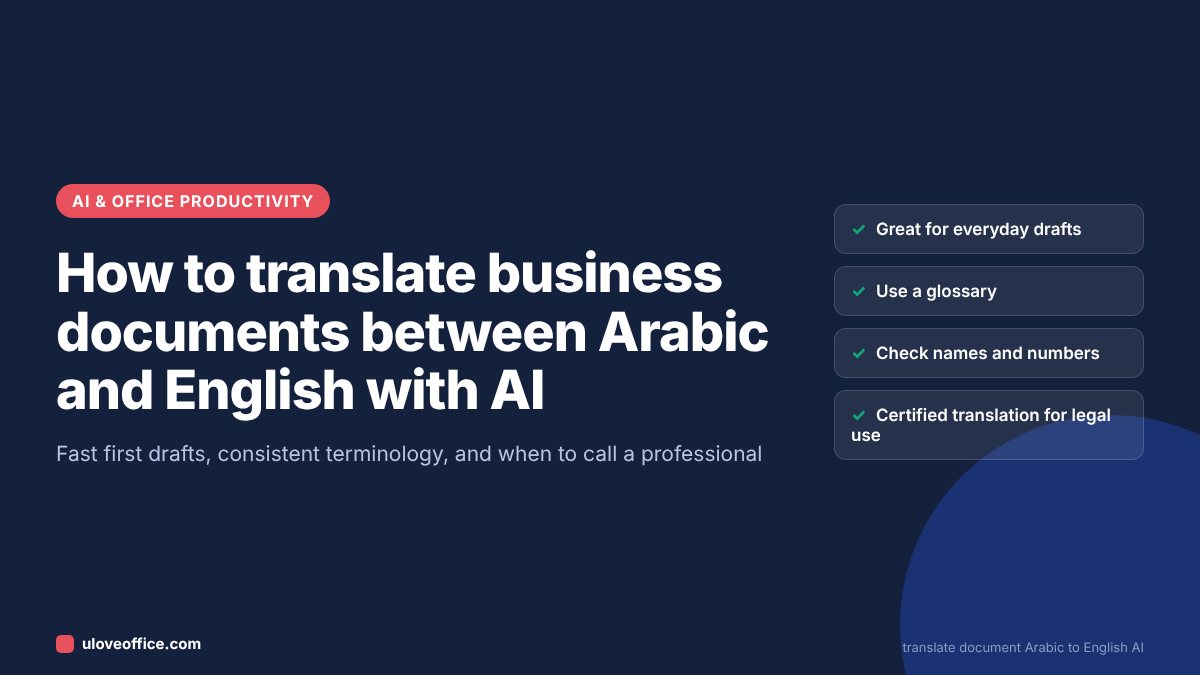
Quick answer: AI tools translate everyday business documents between Arabic and English well: emails, internal policies, product descriptions, job ads and meeting notes. For good results, give the AI context (the document type, audience and tone), a glossary of your company’s key terms, and instructions to keep names, numbers and dates unchanged. Convert scans to text first with OCR PDF, and get the result reviewed by a fluent speaker. For documents with legal effect, such as contracts submitted to courts or government bodies, use a legal translator licensed by the UAE Ministry of Justice; AI translation is not a substitute.
The UAE does business in two languages. Government correspondence, court documents and many customer communications are in Arabic; most internal and international business runs in English. AI translation has become good enough to handle a large share of daily translation work, if you use it carefully.
Why AI translation has improved
Older machine translation translated sentence by sentence and often produced stiff, literal Arabic or confusing English. Modern AI assistants consider the whole document, adapt tone, handle business vocabulary and can follow instructions such as “keep the table structure” or “use Gulf business terminology”. They still make mistakes, especially with names, legal terms and numbers, which is why review matters.
Step 1: Prepare the source document
- Digital documents (Word, text-based PDFs): you can usually paste text or upload the file.
- Scanned documents: run OCR PDF first with Arabic support, then check the OCR text for errors. OCR mistakes become translation mistakes.
- PDFs you need to edit: convert with PDF to Word to keep layout, translate the Word file, then convert back with Word to PDF.
- Remove sensitive data if it is not needed for the translation, or use your company’s approved AI plan. See our guide on whether it is safe to upload company documents to ChatGPT.
Step 2: Create a glossary
A glossary keeps your terminology consistent across documents. List 20 to 50 terms with your preferred translation:
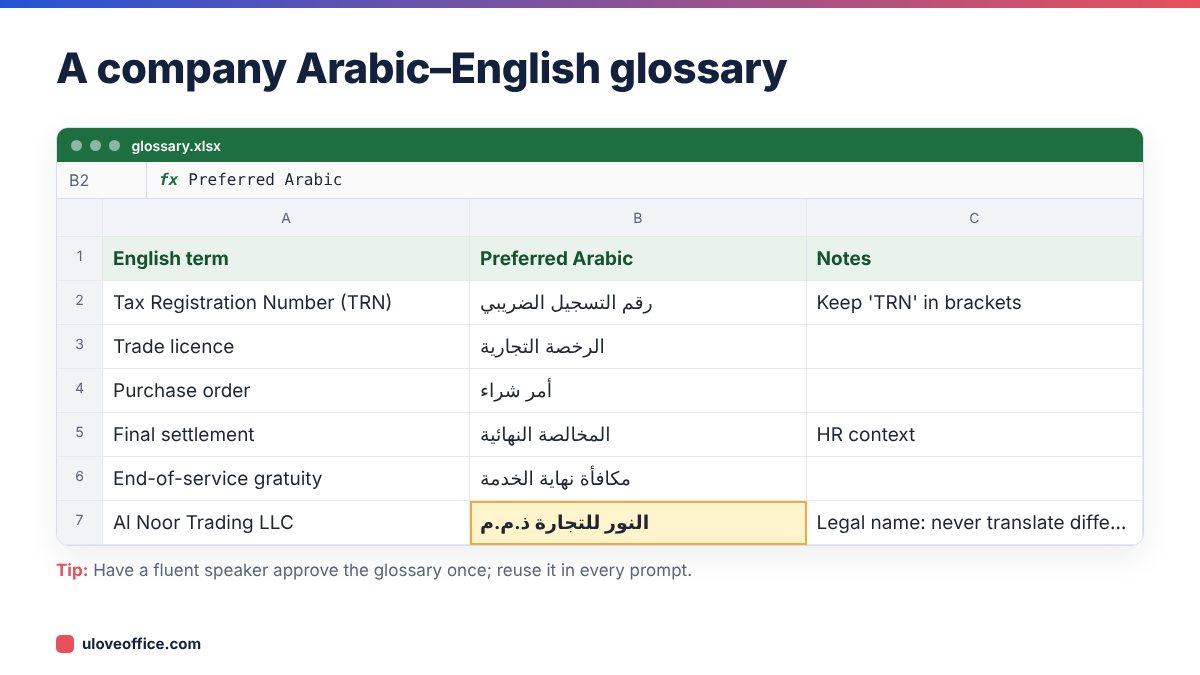
Include: your legal company name exactly as on the trade licence in both languages, product and service names, job titles, department names and common business terms.
Step 3: Write a translation prompt
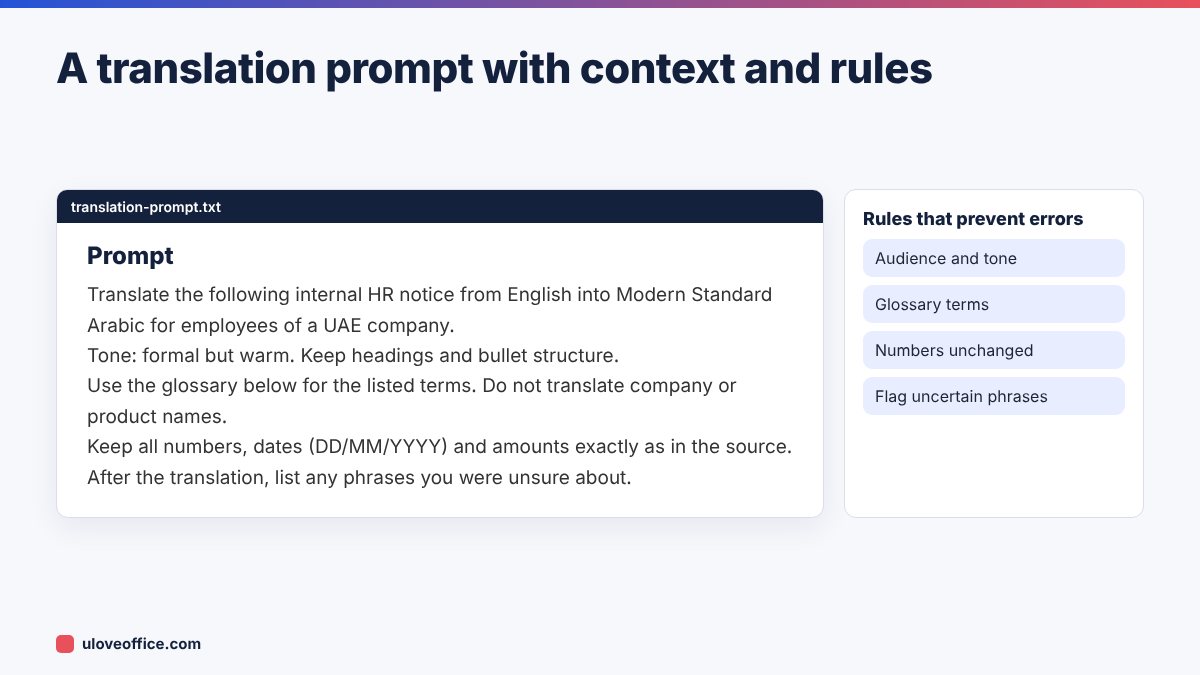
For Arabic to English, specify the variety you need: “Translate into clear British English for an international audience” or “into simple English for staff whose first language is not English”.
Step 4: Review the translation
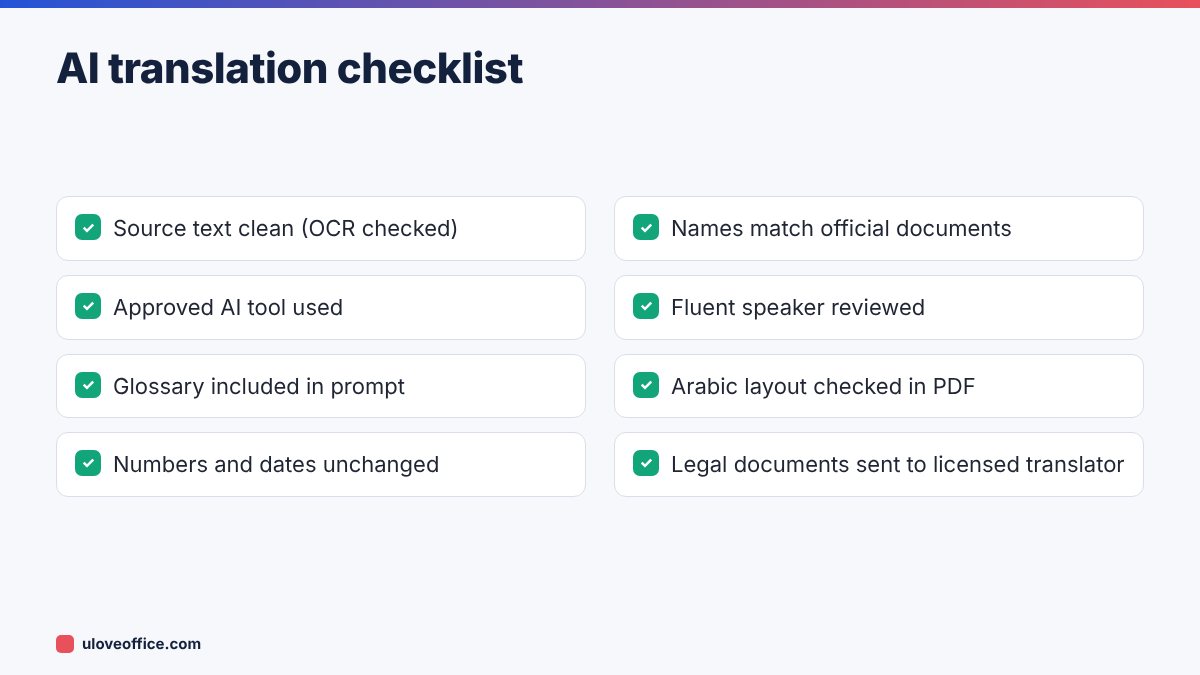
Always have a fluent speaker review, focusing on:
- Names: people, companies and places, especially transliterated names. Compare with passports, Emirates IDs and trade licences.
- Numbers, dates and amounts: check every one against the source. AI occasionally changes formats or digits.
- Legal and HR terms: terms such as “gratuity”, “notice period”, “limited liability” and “termination” must be translated precisely.
- Tone: Arabic business writing often uses more formal openings and closings than English. Adjust.
- Direction and layout: in Word, set Arabic paragraphs to right-to-left; check tables and bullet points.
Use Compare PDFs to compare a revised translation with the previous version, so reviewers see only what changed.
Step 5: Produce the final document
- For bilingual documents, use a two-column table (English left, Arabic right) or alternate paragraphs, depending on your house style.
- Choose a font that renders Arabic well, such as Arial, Tahoma or a dedicated Arabic font.
- Export to PDF and open it to check that Arabic letters are connected and in the right order.
- Keep the source, the AI draft and the reviewed final version, so you know what was changed by the reviewer.
Prompts for common translation jobs
Customer email reply in Arabic: “Translate my reply into polite, formal Arabic suitable for a government-related client in the UAE. Keep the reference number and dates unchanged. [paste reply]”
Arabic letter into English for understanding: “Translate this Arabic letter into clear English. After the translation, summarise in three bullets what the sender is asking us to do and by when. [paste text]”
Product descriptions: “Translate these 20 product descriptions into Arabic for an e-commerce site in the UAE. Keep brand names and model numbers in English. Return one line per product in the same order.”
Bilingual notice: “Create a bilingual staff notice with English on the left and Arabic on the right in a two-column table, from this English text: [paste].”
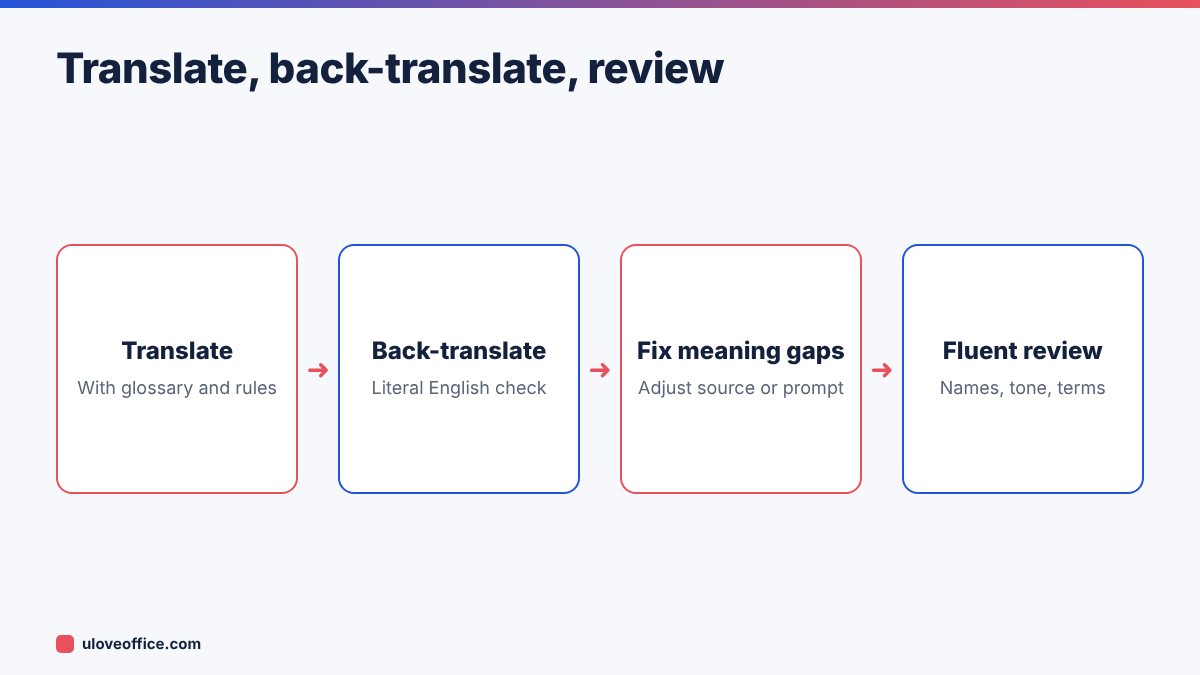
Back-translation check: “Translate this Arabic text back into English as literally as possible, so I can check whether the meaning matches my original English.” This is a quick way for non-Arabic speakers to spot meaning changes before a fluent review.
When you need a legal translator
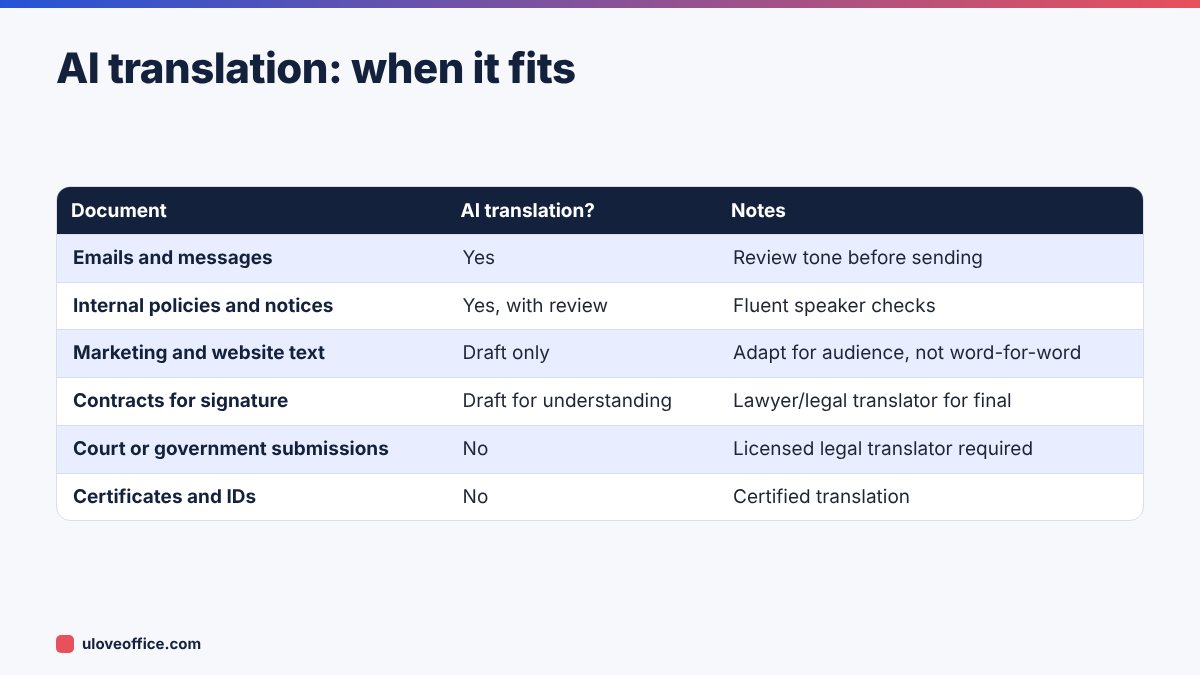
In the UAE, many official processes require translations by a legal translator licensed by the Ministry of Justice (often called “legal translation”). Examples include documents submitted to courts, some government departments and notaries, and translations of foreign certificates. Contracts in dispute are also generally considered in Arabic by UAE courts. AI translation is useful to understand such documents or prepare drafts, but the version you submit must come from the appropriate professional.
For contracts, a common approach is to negotiate in one language, then have a professional produce the bilingual version, with a clause stating which language prevails if the versions differ.
Translating spreadsheets and data
For product lists, price lists or customer lists, translate only the text columns, never the numbers. Copy the column of descriptions into the AI with an instruction to return one translation per line in the same order, then paste back. Check row counts match. For Arabic layout and formatting in Excel, see our guide to using Arabic in Excel.
Worked example: a bilingual employee handbook
A Dubai company with 80 staff needed its employee handbook in Arabic. The HR manager:
- Built a glossary of 45 terms and had it approved by an Arabic-speaking manager.
- Translated the handbook chapter by chapter with the prompt above, asking the AI to flag uncertain phrases.
- Gave each chapter to the Arabic-speaking manager for review, highlighting the flagged phrases first.
- Corrected names, two legal terms and the formatting of right-to-left tables.
- Published the final bilingual PDF.
The project took a week instead of the month quoted by an agency, and the glossary was reused for every later HR notice. The company still used a licensed legal translator for its standard employment contract template, because that document has legal effect.
Keeping translations consistent over time
As your library of translated documents grows, consistency becomes the challenge. Store approved translations in one folder with the source and the date, update the glossary whenever a reviewer corrects a term, and reuse approved paragraphs, such as your standard company description or confidentiality notice, instead of translating them again. Customers and authorities notice when the same thing is translated three different ways.
Common mistakes
- Translating OCR errors: check scanned text before translating.
- Inconsistent names: the same person or company spelled three ways.
- Literal marketing translation: adapt messages for the audience instead.
- No review: sending AI translations to customers or authorities without a fluent check.
- Uploading confidential documents to unapproved tools.
- Relying on AI for legal submissions that require licensed translation.
Choosing between AI, an in-house speaker and an agency
- AI plus in-house review suits routine internal documents, emails and notices. It is fast and cheap, but depends on a colleague with time and good language skills.
- A translation agency suits large projects, marketing campaigns and anything published widely. Agencies can also use your glossary.
- A licensed legal translator is required for many official and court purposes and should be used for contracts with legal effect.
Many UAE businesses use all three, depending on the document. Decide which route each document type takes and write it into your office procedures.
Key takeaways
- AI is excellent for everyday translation drafts in both directions.
- Prepare clean source text, use a glossary and give clear rules in the prompt.
- Keep names, numbers and dates unchanged and check every one.
- Have a fluent speaker review before anything is sent or published.
- Use a licensed legal translator for documents with legal effect.
Whichever route you choose, keep the glossary as the single source of truth for terminology.
📘 Continue reading
Frequently asked questions
Is AI translation accurate enough for customer emails?
Usually yes after a quick review, especially for routine messages.
Can AI translate a PDF and keep the layout?
Some tools can, but results vary. Converting to Word first gives you more control.
Which Arabic should I ask for?
Modern Standard Arabic for formal business documents. Gulf dialect only for informal marketing aimed at local audiences, reviewed by a native speaker.
Can I use AI translation for my trade licence or certificates?
For understanding, yes. For official use, obtain certified or legal translations as the authority requires.
Conclusion
AI makes bilingual business practical for small UAE teams: emails, notices, policies and product content can be translated in minutes. Prepare clean text, use a glossary, keep numbers and names untouched, and always have a fluent speaker review the result. For anything with legal effect, use a licensed legal translator, and keep AI for what it does best: fast, consistent first drafts.
Last checked: 9 November 2026.