
How to organize business expense receipts in the UAE
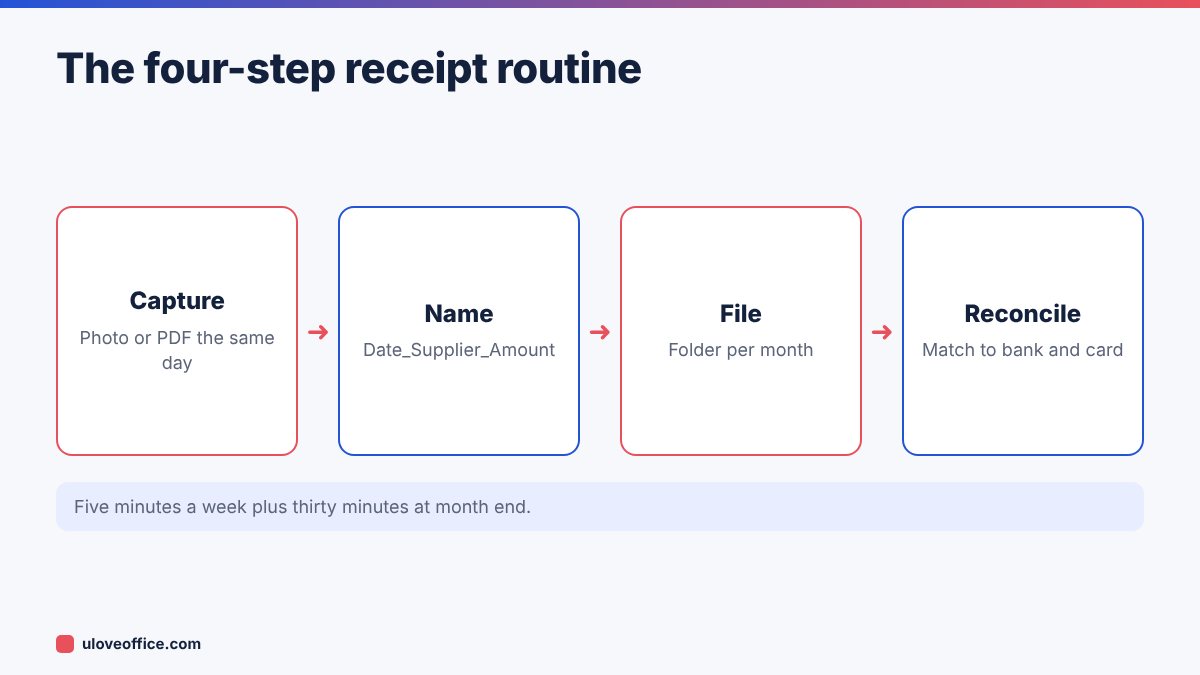
Quick answer: Organise business receipts with a four-step routine: capture every receipt the day you get it (a phone photo or the emailed PDF), name it with one rule such as 2026-11-04_Supplier_AED-245.50.pdf, file it in a folder for the month, and reconcile monthly against your bank and card statements. Mark each receipt as VAT-recoverable or not, and keep proper tax invoices for any purchase where you want to recover input VAT. Convert photos to PDF with JPG to PDF, merge each month with Merge PDF, and make scans searchable with OCR PDF.
Thermal-paper receipts from UAE shops fade within months, and receipts stuffed in a drawer are useless at VAT time or in an FTA audit. A small, consistent routine solves both problems and makes expense claims and bookkeeping much faster.
Why receipts matter in the UAE
- VAT recovery: to recover input VAT, you generally need a valid tax invoice. A card slip alone is not enough. Without the right document, you lose 5% on every eligible purchase.
- Corporate tax: expenses you deduct must be supported by records, which must be kept for the required period (seven years for corporate tax records).
- Audits: the FTA can ask for the document behind any expense or VAT claim.
- Employee expense claims: clear receipts make approvals quick and reduce disputes.
- Fading paper: thermal receipts can become blank within months, especially in hot cars.
Tax invoice, simplified invoice or receipt?
Not every piece of paper from a shop is the same.
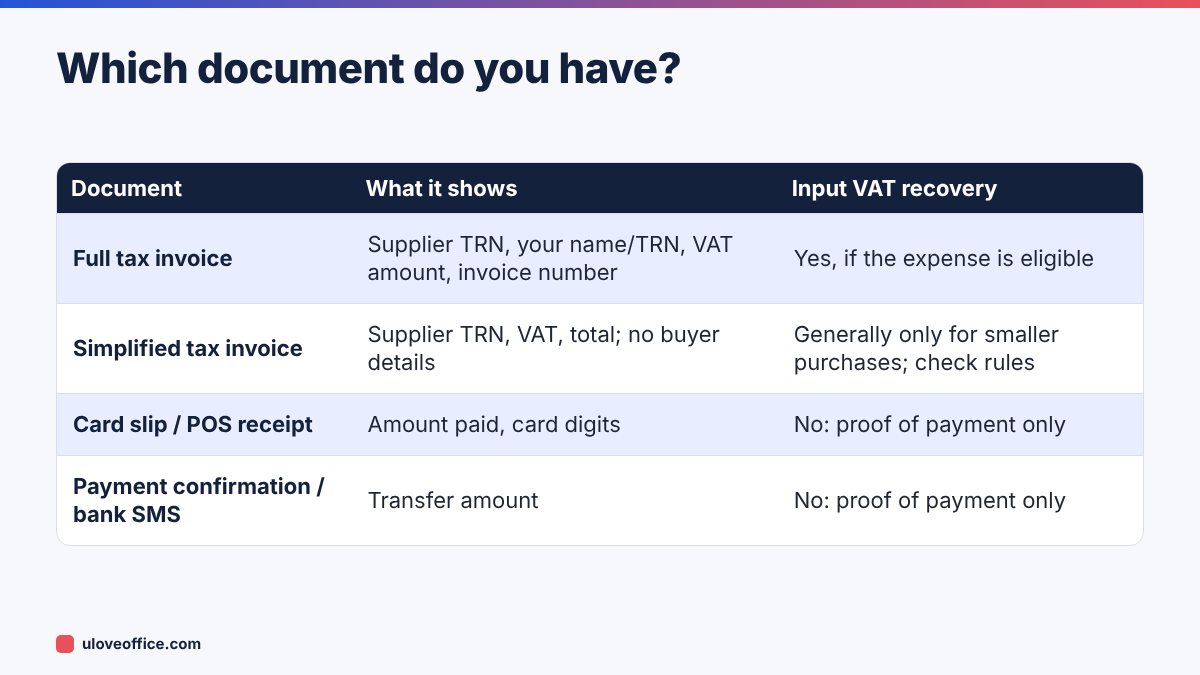
A practical rule: for any business purchase above a few hundred dirhams, ask for a full tax invoice in your company’s name with your TRN. Most suppliers will issue one on request, but it is much harder to get one weeks later.
Step 1: Capture every receipt on the day
The biggest cause of lost receipts is delay. Make capture instant:
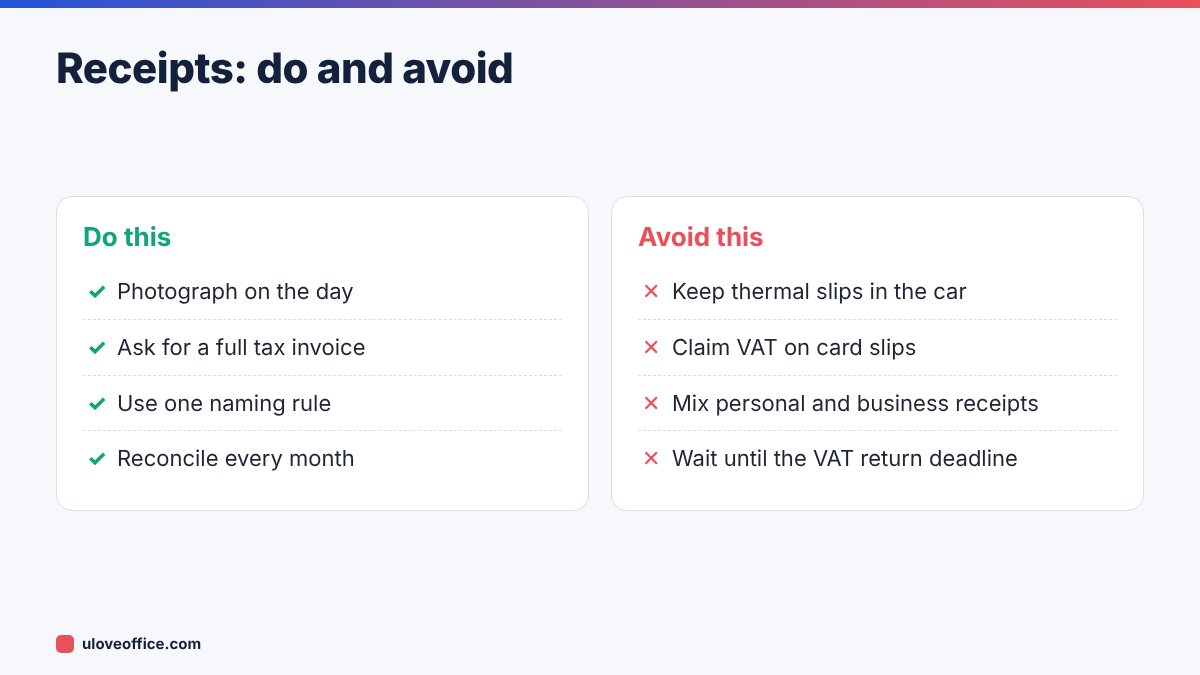
- Paper receipts: take a photo before you leave the counter. Lay the receipt flat, use good light and capture all four edges.
- Email receipts: forward them to a dedicated mailbox, such as
receipts@yourcompany.ae, or save the PDF immediately. - Online purchases: download the invoice PDF from the supplier’s account page, not just the order confirmation.
- Fuel, parking and Salik: download monthly statements where available, rather than chasing individual slips.
Keep the paper original in an envelope labelled with the month until the month is reconciled, then decide whether you need to keep it (see below).
Step 2: Name files with one rule
A consistent name means you can find any receipt by searching your folder. Use:
YYYY-MM-DD_Supplier_AED-Amount.pdf
For example: 2026-11-04_Carrefour_AED-245.50.pdf or 2026-11-12_Emirates-Airline_AED-3120.00.pdf.
Add a short tag if useful: _TI for tax invoice, _R for receipt only, or a project code.
Step 3: File in a monthly folder
Create one folder per month:
Receipts/

  2026-11/

    _Unmatched/

    2026-11-04_Carrefour_AED-245.50.pdf

    ...

  2026-12/
At month end:
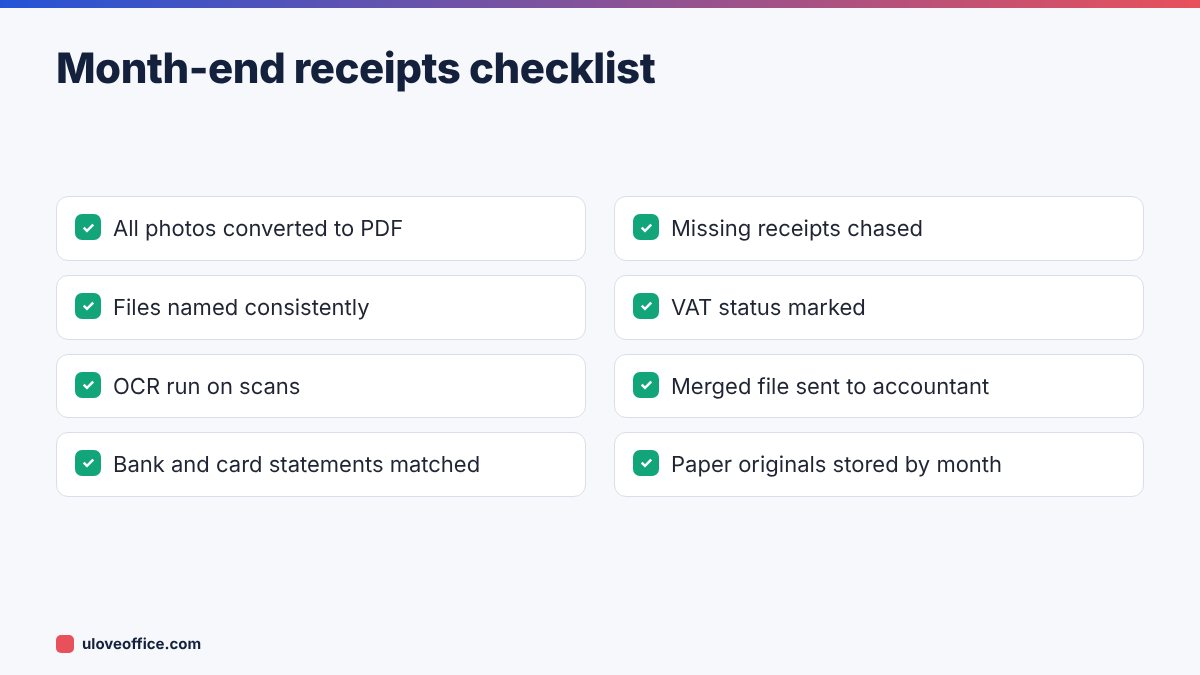
- Convert any remaining photos to PDF with JPG to PDF. If your phone saves HEIC files, convert them first; our guide on converting HEIC to JPG explains how.
- Run OCR PDF so text on the receipts is searchable.
- Optionally merge all receipts for the month, in date order, into one file with Merge PDF, named
2026-11_Receipts-all.pdf. Keep the individual files too. - Compress large files with Compress PDF if you need to email them to your accountant.
Step 4: Reconcile monthly
Download your bank and company card statements for the month and match each transaction to a receipt:
- Tick each matched transaction in your receipt log.
- Anything on the statement without a receipt goes on a missing list. Chase it immediately; suppliers can usually resend invoices within the same month.
- Anything in your receipt folder that is not on a statement (cash payments, personal card payments to be reimbursed) goes to the correct claim or petty cash record.
Our guide on Power Query shows how to clean bank exports automatically if you do this every month.
VAT: recoverable or not?
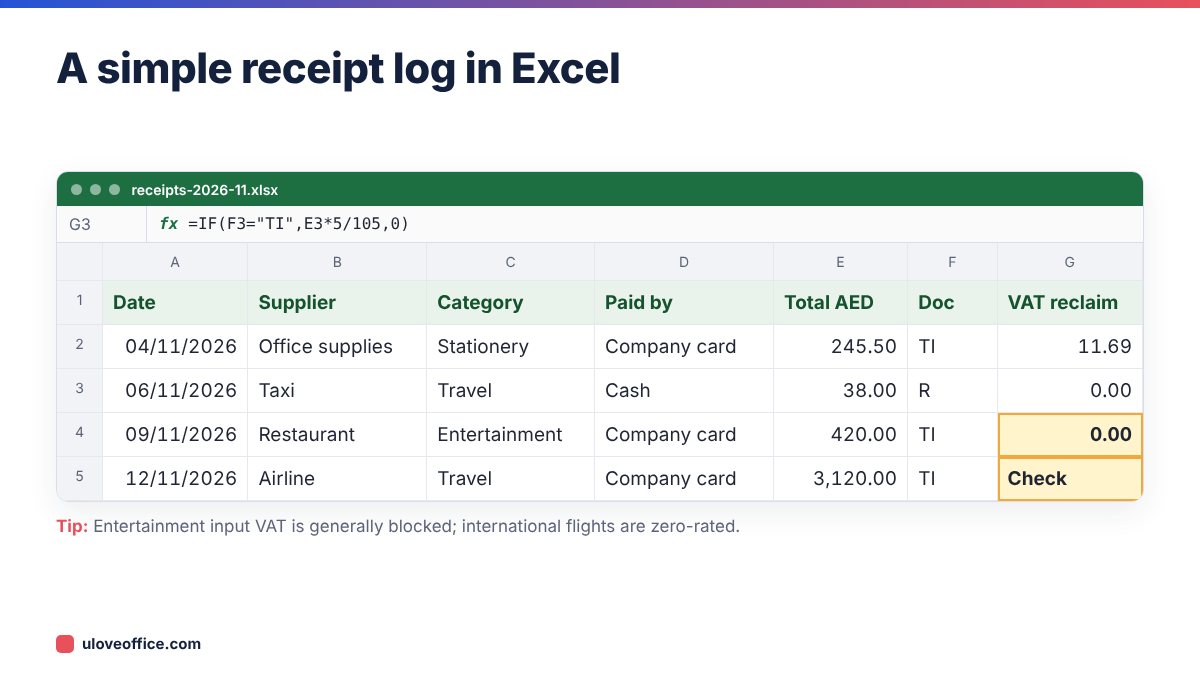
Mark each receipt so your accountant knows how to treat it. In general under UAE VAT rules:
- Recoverable (with a valid tax invoice, for business use): office supplies, business software, equipment, professional fees, business travel within the UAE where VAT is charged, utilities for business premises.
- Blocked or restricted: entertainment of non-employees, motor vehicles available for personal use, and some staff benefits provided for free.
- No VAT to recover: zero-rated supplies such as international flights, exempt supplies, and purchases from suppliers not registered for VAT.
When unsure, mark the receipt “Check” and ask your accountant. Never claim input VAT on a card slip without a tax invoice.
Employee expense claims
If staff pay for business expenses personally:
- Give them the same naming rule and a simple claim template.
- Require one claim per month, with receipts attached as one merged PDF.
- Set a deadline, such as the fifth working day of the next month.
- Reject claims without receipts above a set amount.
Our article on writing an expense reimbursement policy has a ready-made policy you can adapt.
Do I need to keep the paper originals?
UAE rules generally accept electronic records that are complete, legible and retrievable, and must be kept for the legal retention period. Good practice is to keep paper originals until the month is reconciled and the photo or scan is confirmed clear, and longer for high-value purchases or where a supplier contract requires originals. Ask your accountant whether any specific documents should be kept on paper.
Tools that make this easier
- Your phone’s scanner app (the Notes app on iPhone or Google Drive scan on Android) creates straightened PDFs automatically.
- Accounting software with receipt capture can attach images to transactions directly.
- ULoveOffice PDF tools handle conversion, OCR, merging and compression for free.
- AI extraction: if you have dozens of receipts, our guide on turning receipt photos into an expense spreadsheet with AI shows how to extract the data automatically.
Common mistakes
Worked example: a consultant’s month
A Dubai-based consultant pays for 23 business expenses in November: coworking, software subscriptions, taxis, client lunches, a printer and a flight to Riyadh. Using the routine:
- 15 receipts arrive by email and are saved straight to the November folder with the naming rule.
- 8 paper receipts are photographed on the day. Two of them are full tax invoices requested at the counter.
- At month end, everything is OCR’d and merged, and the card statement is matched in 20 minutes. One coworking invoice is missing; the provider resends it the same day.
- The log shows AED 214 of recoverable input VAT, mainly from the printer and software. The client lunches are marked as entertainment and the flight as zero-rated.
The accountant receives one merged PDF and one Excel log, and the VAT return figures are ready without questions.
Setting up the system for a team
If several people spend money on behalf of the business, decide three things in writing:
- Where receipts go: one shared folder or one receipts email address, never personal inboxes.
- Who reconciles: one person matches statements each month, so nothing is checked twice or not at all.
- The deadline: for example, all receipts for a month uploaded by the third working day of the next month.
Give each card holder a one-page instruction sheet with the naming rule, the codes for VAT status and the deadline. Review compliance monthly for the first quarter; habits form quickly when someone checks.
📘 Continue reading
Frequently asked questions
Is a photo of a receipt valid for VAT?
A clear electronic copy of a valid tax invoice is generally acceptable. A photo of a card slip is still only a card slip.
How long should I keep receipts?
In line with tax record-keeping rules: generally at least five years for VAT and seven years for corporate tax records. Confirm with your accountant.
What about receipts in Arabic?
They are fine. OCR tools that support Arabic make them searchable.
Can I use one folder for the whole year?
You can, but monthly folders make reconciliation and VAT quarters much easier.
Petty cash and cash receipts
Cash spending is where receipts go missing most often. Keep a simple petty cash log in Excel with date, purpose, amount, receipt reference and the name of the person who spent it, and top up the float only against a reconciled log. Ask for a receipt even for small cash purchases such as taxis and parking, and photograph them the same day like any other receipt.
Key takeaways
- A card slip proves payment; only a tax invoice supports input VAT recovery.
- Capture receipts on the day; thermal paper fades and memories fade faster.
- One naming rule and one folder per month make every receipt searchable.
- Monthly reconciliation against bank and card statements finds missing documents while suppliers can still resend them.
- Mark VAT status as you go so your accountant does not have to guess.
Conclusion
A receipt system does not need special software. Capture every receipt on the day, name it with one rule, file it by month and reconcile against your statements before the month closes. Ask for full tax invoices on larger purchases and mark VAT status as you go. Your VAT returns, expense claims and any future audit will all be faster.
Last checked: 9 November 2026. General information only; confirm VAT treatment with your accountant.