
How to summarize a long PDF report with AI without missing key figures
Quick answer: To summarise a long PDF with AI, first make sure the text is readable (run OCR PDF on scans), split very long files into sections, and use your company-approved AI tool. Ask for the summary in a fixed structure (purpose, key findings, figures, risks, actions) and require page references for every figure. Then ask separately for a table of all key numbers with page numbers, and check each number against the PDF before you share the summary.
Annual reports, audit reports, tenders, market studies, policy documents and board packs often run to 50 or 100 pages. AI can read them in seconds. The risk is that it misses something important or states a figure wrongly, and a confident-sounding summary hides the error. This guide shows how to get speed without losing accuracy.
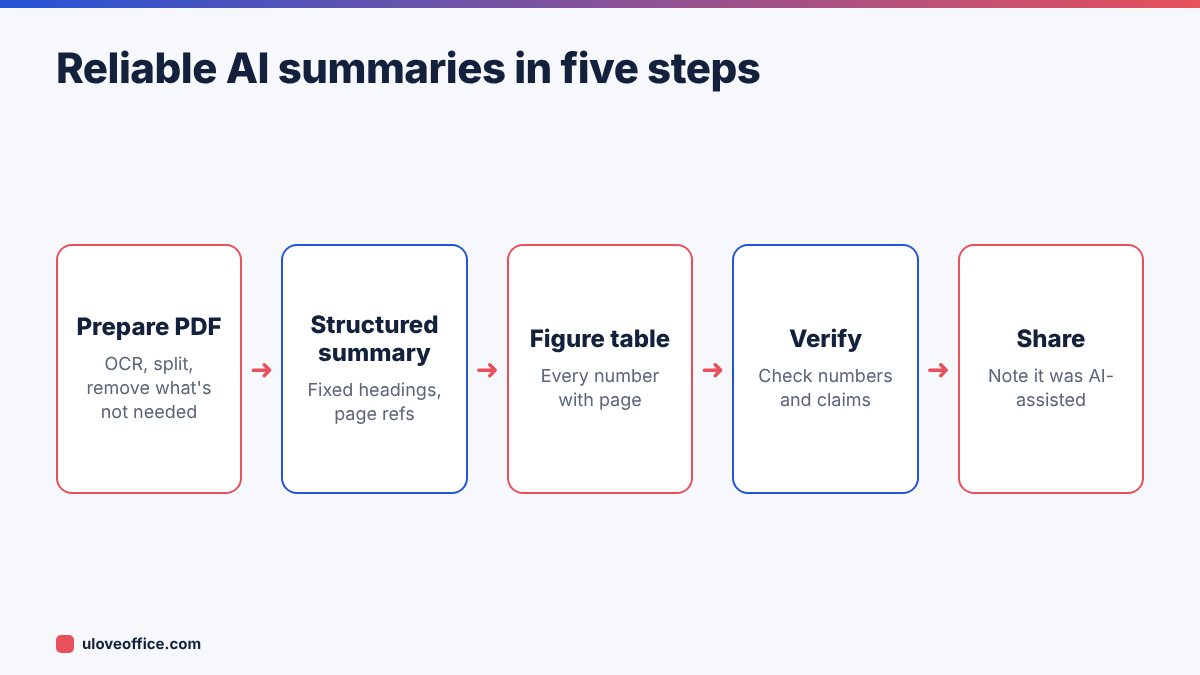
Step 1: Prepare the PDF
The quality of the summary depends on what the AI can read.
- Scanned reports: run OCR PDF so the text is selectable. Test by trying to select a paragraph; if you cannot, the AI may only see images.
- Very long files: many tools have limits on file size or length, and quality drops on very long inputs. Split the report into logical parts (for example by chapter) with Split PDF.
- Large files: reduce size with Compress PDF if the upload is rejected.
- Protected files: if you are authorised to use the file, remove the password with Unlock PDF.
- Irrelevant pages: remove appendices you do not need with Organize PDF, so the AI focuses on what matters.
- Confidential content: use an approved business AI plan, and remove personal data first. See our guide on uploading company documents to ChatGPT safely.
Step 2: Ask for a structured summary
A vague request like “summarise this” produces a generic paragraph. Ask for structure and references:
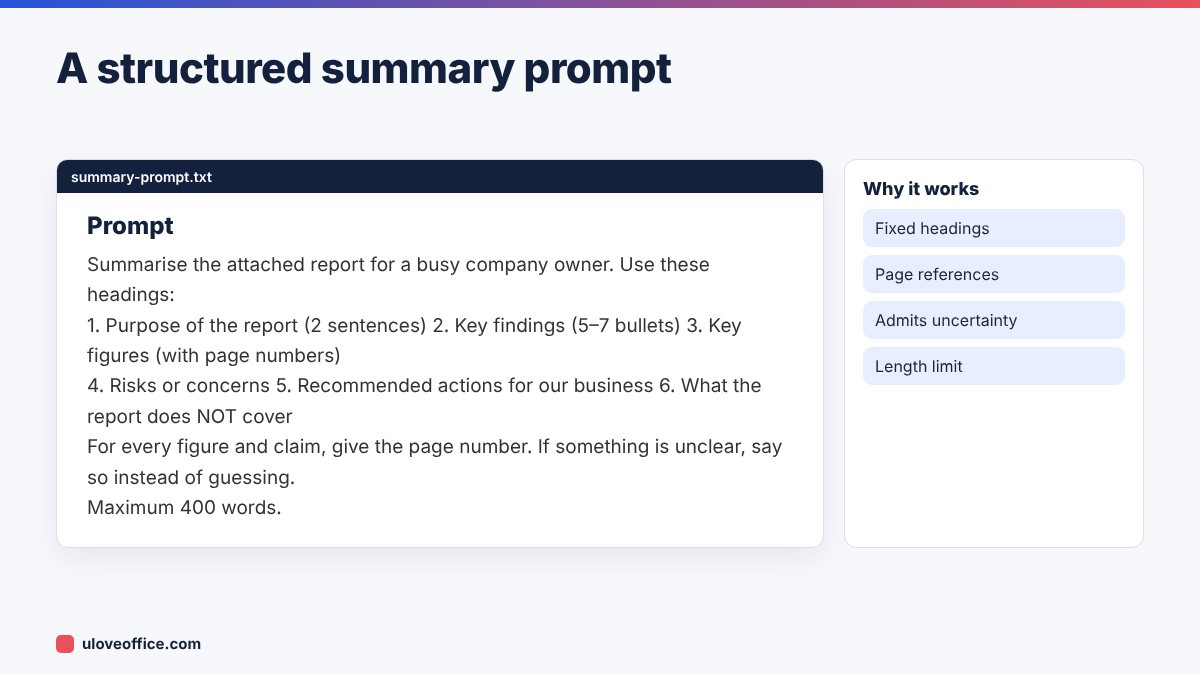
The “What the report does NOT cover” heading is surprisingly useful. It stops readers assuming the report answered a question it did not.
Step 3: Extract figures separately
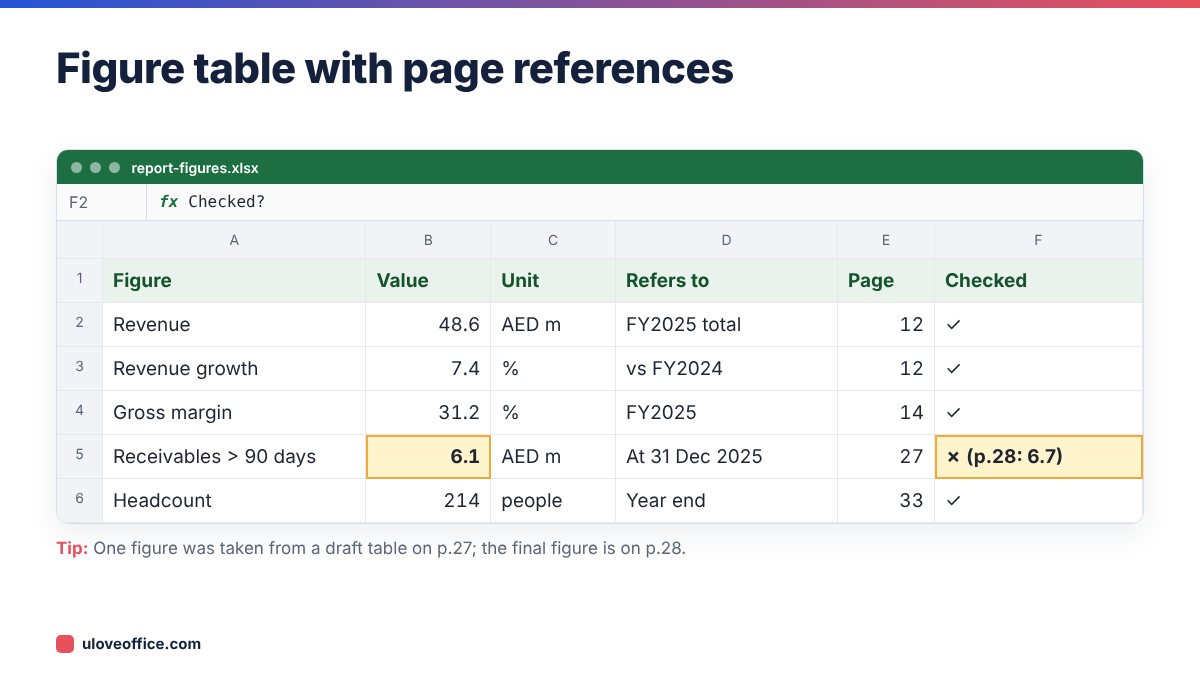
Summaries often round or merge numbers. Ask for a dedicated figure table in a second prompt:
“List every financial figure, percentage and date mentioned in the report in a table with columns: Figure, Value, Unit, What it refers to, Page. Do not round. Do not calculate anything that is not in the report.”
Paste the table into Excel. Now you can sort, filter and check numbers one by one, and you can reuse them in your own analysis.
Step 4: Verify
Verification does not take long if you have page numbers:
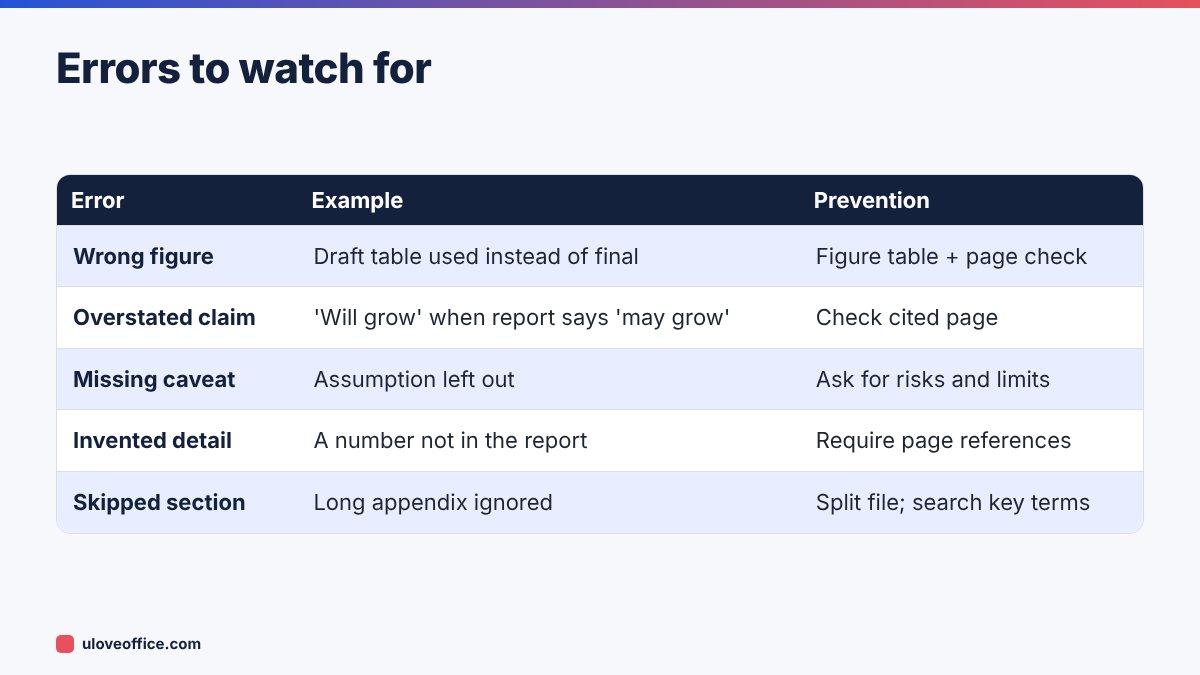
- Check every figure in the figure table against the PDF page. Mark it ✓ or correct it.
- Check the key findings: open the cited page for each bullet and confirm the report actually says that, not something weaker or different.
- Search for missing items: use Ctrl+F in the PDF for words that matter to your business, such as “risk”, “penalty”, “deadline”, “UAE”, “VAT” or your company or product names, and check the summary covers them.
- Check the conclusion section of the report directly; it is the author’s own summary and a good cross-check.
If the AI claims something without a page reference, or the page does not support it, remove it from the summary.
Prompts for different needs
Executive summary for the owner: the structured prompt above, 300–400 words.
One-paragraph summary for an email: “Summarise the report in one paragraph of no more than 80 words for an email to the management team. Include the two most important numbers with page references.”
Action list: “List every recommendation or requirement in the report that applies to a small UAE trading company, with page numbers, as a checklist.”
Comparison with last year’s report: upload both and ask: “Compare these two reports. List what changed in figures, conclusions and recommendations, with page numbers from each.” For wording changes in two versions of the same document, Compare PDFs is more reliable.
Questions to ask the author: “List ten questions a careful reader should ask the authors of this report, focusing on assumptions and missing information.”
Tender or RFP summary: “List all submission requirements, deadlines, mandatory documents, evaluation criteria and penalties in this tender document, with page numbers.” Then check them line by line before submitting. Our guide on comparing supplier quotations covers the buying side.
Common AI summary errors
Summarising a set of documents
Sometimes the job is not one long report but many related documents: a folder of supplier proposals, a set of policy updates or a quarter’s worth of board minutes. Two approaches work well:
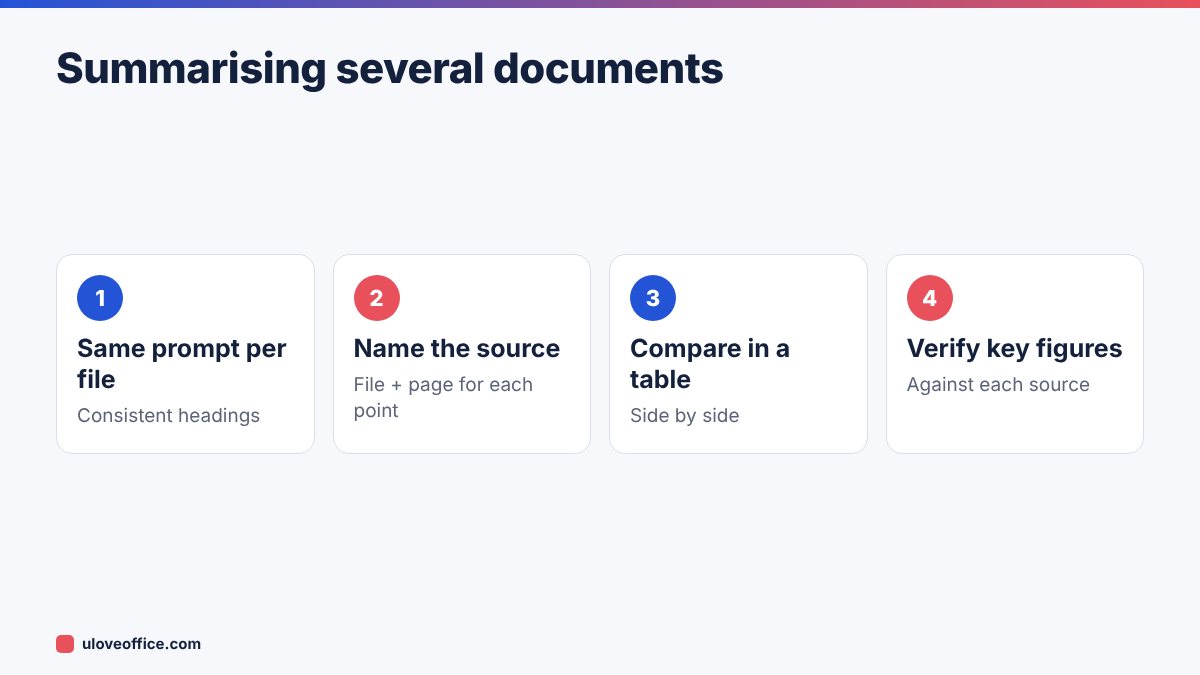
- Summarise each document separately with the same structured prompt, then ask the AI to compare the summaries in a table. This keeps each summary grounded in its own source and page numbers.
- Merge documents into one PDF with Merge PDF, add page numbers so references are unambiguous, then summarise. This works for smaller sets that stay within your tool’s limits.
Either way, ask the AI to name the source document for every point, so readers know which file to open.
Building a summary template for your team
If your team summarises similar documents regularly, such as monthly supplier reports or regulatory updates, agree one template: the same headings, the same length and the same figure table columns. Save the prompt in a shared document. Summaries become comparable month to month, managers know where to look for the information they need, and new team members produce consistent work from their first week.
Using summaries in meetings
A good summary changes how meetings run. Circulate the one-page summary and the figure table a day before, with the full report attached. Ask attendees to read the summary and check any page they want to question. The meeting can then focus on decisions and actions instead of reading the report together. Record the agreed actions against the report’s page references, so follow-up is easy.
Sharing the summary responsibly
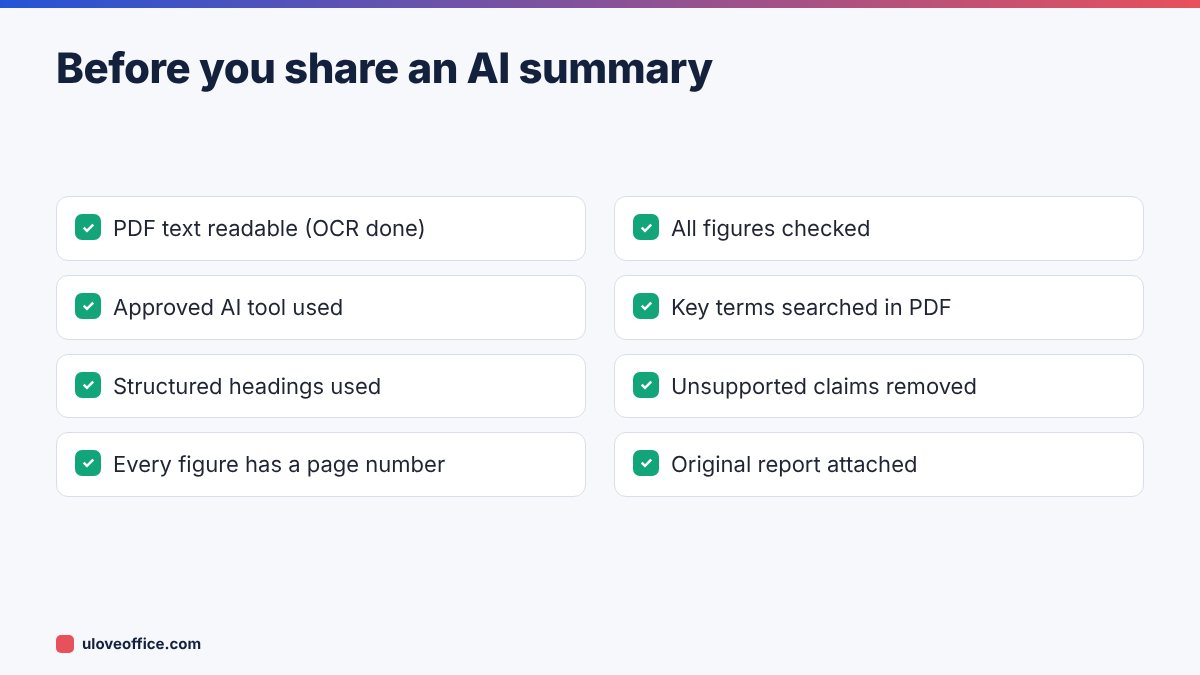
- State that the summary was prepared with AI assistance and checked against the source, if your company policy asks for this.
- Attach or link the original report, so readers can go deeper.
- Do not present AI summaries of legal, tax or regulatory documents as advice; flag where professional review is needed.
- Store the summary, the figure table and the original report together.
Worked example: a 90-page market study
A business development manager received a 90-page market study on UAE office furniture demand and had to brief the owner the next morning. She split the PDF into four parts, ran the structured prompt on each, then asked for a combined summary and a figure table. Checking 23 figures took 20 minutes and found two errors: one market size figure was from a scenario table rather than the base case, and one growth rate was for Saudi Arabia, not the UAE. The corrected one-page brief was ready in about an hour, with page numbers for every claim. The owner asked two follow-up questions, both answered quickly from the referenced pages.
Finally, keep a short log of the corrections you make to AI summaries. Patterns, such as the AI often confusing draft and final tables, tell you how to improve your prompts next time.
Key takeaways
- Prepare the PDF: OCR scans, split long files, remove irrelevant pages.
- Use a fixed structure and require page references for every claim.
- Extract figures into a separate table and check each against the source.
- Search the PDF for terms that matter to you to catch omissions.
- Share the summary with the original report and a note on how it was produced.
A note on Arabic and bilingual reports
Many UAE reports, especially from government bodies, are published in Arabic or in both languages. You can upload the Arabic version and ask for an English summary, or the reverse. Ask the AI to quote the original Arabic phrase next to key translated terms, so a bilingual colleague can quickly confirm meanings that matter, such as obligations, deadlines and penalties. If both language versions exist, summarise the one designated as authoritative, which is usually stated near the beginning or end of the document.
📘 Continue reading
Frequently asked questions
Can AI summarise Arabic reports?
Yes. You can ask for the summary in English or Arabic. Check figures and names carefully.
What is the maximum PDF size AI can handle?
It depends on the tool and plan. Splitting long reports gives better results anyway.
Can I trust the summary if I don’t have time to check?
For internal reading, maybe; for decisions or sharing, no. At minimum, check the figures you will quote.
Should I use AI to summarise contracts?
For a quick understanding, yes, but legal review is still needed before relying on any interpretation.
Conclusion
AI turns hours of reading into minutes, but only careful prompts and a quick verification step make the result trustworthy. Prepare the PDF, ask for a structured summary with page references, extract figures separately, check them, and share the summary alongside the original. You get the speed of AI with the reliability your manager expects.
Last checked: 9 November 2026.