
Meeting minutes format: template and real example
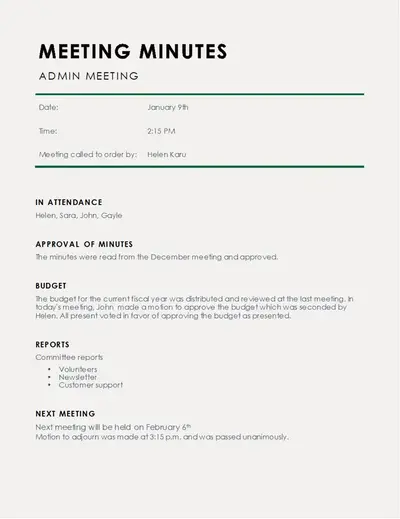
Direct answer: what is the correct meeting minutes format?
A practical meeting minutes format should record the meeting name, date, time, location or platform, attendees, agenda, key discussion points, decisions, action items, owners, deadlines, and next meeting details. The best meeting minutes format is clear enough that someone who did not attend can understand what was decided and what happens next. You do not need a word-for-word transcript. Use a consistent meeting minutes template, separate decisions from discussion, and give every important action an owner and due date.
Meeting minutes format template
Use this meeting minutes format as a starting point for team, project, client, or business meetings:
MEETING MINUTES
Meeting title: [Name of meeting]
Date: [DD Month YYYY]
Time: [Start time – End time]
Location/platform: [Office, Teams, Zoom, etc.]
Chair/facilitator: [Name]
Minutes prepared by: [Name]
Attendees: [Names]
Absent/apologies: [Names]
Meeting purpose:
[One or two sentences explaining why the meeting was held.]
Agenda:
1. [Agenda item]
2. [Agenda item]
3. [Agenda item]
Discussion and decisions:
1. [Topic]
Discussion: [Short summary of important points.]
Decision: [What was agreed, if anything.]
- [Topic]
Discussion: [Short summary.]
Decision: [What was agreed.]
Action items:
| Action | Owner | Deadline | Status |
| [Task] | [Name] | [Date] | [Open/In progress/Done] |
Next meeting:
[Date, time and proposed topics]
Meeting adjourned: [Time]
Step 1: Start with the meeting details
Put the basic facts at the top of the document. Include the organization or team name, meeting title, date, start and end time, location or online platform, facilitator or chair, and minute-taker.
These details make the record searchable and immediately tell readers which meeting the document belongs to. For recurring meetings, use the same layout every time so people can scan the document quickly.
Step 2: Record attendees and absences
List the people who attended and, when useful, the people who were absent or sent apologies. If guests or external participants joined, identify them clearly.
For a small internal meeting, names may be enough. For a formal meeting, you may also need roles or titles. The exact requirements can depend on the organization and type of meeting, so follow any applicable company policy or governance rules.
Step 3: Follow the agenda
Structure the body of the minutes around the agenda. This is one of the simplest ways to keep a meeting minutes format organized.
For each agenda item, capture the important issue discussed, the decision reached, and any action that follows. Avoid turning the minutes into a transcript. A useful test is: could a reader understand the outcome without reading every sentence spoken during the meeting?
For example, instead of writing, “The team discussed several options for the website redesign and several people shared opinions,” write: “The team reviewed three redesign options and agreed to proceed with Option B, subject to final accessibility checks.”
Step 4: Separate decisions from discussion
A strong meeting minutes format makes decisions easy to find. Use a clear “Decision” label or a separate decisions section.
Record what was approved, rejected, postponed, or assigned. If a topic was discussed but no decision was made, say that clearly, such as “Decision postponed until the next meeting pending supplier quotations.”
This approach keeps the minutes useful without adding unnecessary detail.
Step 5: Turn follow-up into action items
Action items are where meeting minutes become useful after the meeting. Each important task should answer three questions: What needs to be done? Who owns it? When is it due?
Use a simple table with Action, Owner, Deadline, and Status. Avoid vague assignments such as “Team to review” or “Discuss later.” A stronger entry is “Ahmed to compare three hosting quotations by 20 August 2026.”
If the deadline is not known, write “To be confirmed” rather than inventing a date.
Step 6: Add the next meeting and close the record
Finish the meeting minutes with the next meeting date and time if one has been agreed, followed by the meeting end time. If there are unresolved items, list them as carry-over items.
Before sending the minutes, check names, dates, decisions, figures, owners, and deadlines. Then share the final version with the relevant participants and store it where the team can find it later.
Real example: business meeting minutes with AED figures
The following example shows how a meeting minutes format can be used for a real-world business discussion. The AED figures are illustrative.
ABC Trading LLC
Project Budget Review Meeting Minutes
Date: 14 August 2026
Time: 10:00 AM–11:00 AM
Location: Dubai office / Microsoft Teams
Chair: Sarah Khan
Minutes prepared by: Ahmed Ali
Attendees: Sarah Khan, Ahmed Ali, Omar Hassan, Lina Joseph
Absent: None
Meeting purpose:
Review the proposed website project budget and agree on the next procurement steps.
Agenda:
1. Website development budget
2. Hosting and maintenance
3. Approval and next steps
Discussion and decisions:
- Website development budget
The team reviewed a proposed development budget of AED 18,000. The scope includes design, development, content migration, testing, and launch.
Decision: The team approved the AED 18,000 development budget, subject to the final statement of work.
- Hosting and maintenance
The team reviewed an annual hosting and maintenance estimate of AED 3,600.
Decision: The team agreed to proceed with the AED 3,600 annual estimate and obtain one additional quotation before purchase.
- Approval and next steps
The combined first-year project and hosting estimate is AED 21,600.
Decision: Sarah approved moving to the final quotation stage.
Action items:
| Action | Owner | Deadline | Status |
| Prepare final statement of work | Ahmed | 18 Aug 2026 | Open |
| Obtain one additional hosting quotation | Omar | 19 Aug 2026 | Open |
| Review final quotation | Sarah | 20 Aug 2026 | Open |
Next meeting: 21 August 2026 at 10:00 AM
Meeting adjourned: 11:00 AM
Common mistakes to avoid
A meeting minutes format becomes less useful when it contains too much detail or too little accountability. Avoid these common problems:
- Writing a full transcript instead of a concise record.
• Leaving out the meeting date, attendees, or purpose.
• Recording decisions without saying who must act.
• Listing action items without deadlines.
• Using vague phrases such as “someone will check.”
• Mixing personal opinions with factual meeting records.
• Changing the structure from one meeting to the next.
• Sending the minutes without checking names, figures, dates, and decisions.
The goal is not to record everything. The goal is to create a reliable reference for decisions, responsibilities, and follow-up.
FAQ: meeting minutes format questions
What should be included in meeting minutes?
A standard meeting minutes format normally includes the meeting title, date, time, location or platform, attendees, agenda, key discussion points, decisions, action items, owners, deadlines, and next meeting details.
What is the proper format for minutes of a meeting?
Start with the meeting details and attendees, then follow the agenda item by item. For each topic, summarize important discussion points and record decisions and action items. End with follow-up information and the meeting end time.
How do you write meeting minutes with examples?
Prepare a reusable meeting minutes template, take concise notes during the meeting, record decisions and action items, then review the document for accuracy. A worked example should show realistic details such as dates, responsibilities, deadlines, and, where relevant, business figures.
Should meeting minutes include action items?
Yes. Action items make the minutes more useful because they show what must happen after the meeting, who is responsible, and when the task is due.
How detailed should meeting minutes be?
They should be detailed enough to preserve important decisions, actions, and context, but they generally do not need to reproduce every statement or conversation. The appropriate level of detail depends on the meeting type and any organizational requirements.
Conclusion
The best meeting minutes format is simple, consistent, and action-focused. Start with the meeting details, follow the agenda, summarize important discussion points, clearly record decisions, and assign every follow-up task to an owner with a deadline. A reusable meeting minutes template can make this process faster and reduce missed information.
If you want to create structured minutes without starting from a blank page, use the Meeting Minutes tool on uLoveOffice to prepare your document and keep the format consistent.