
Markup vs margin: the difference with worked examples
Markup vs margin: the difference with worked examples
markup vs margin formula, margin vs markup calculator, markup percentage, profit margin percentage, gross margin formula, markup formula, calculate markup, calculate margin, markup to margin conversion, margin to markup conversion, Excel markup vs margin, markup vs margin examples, pricing formula Excel
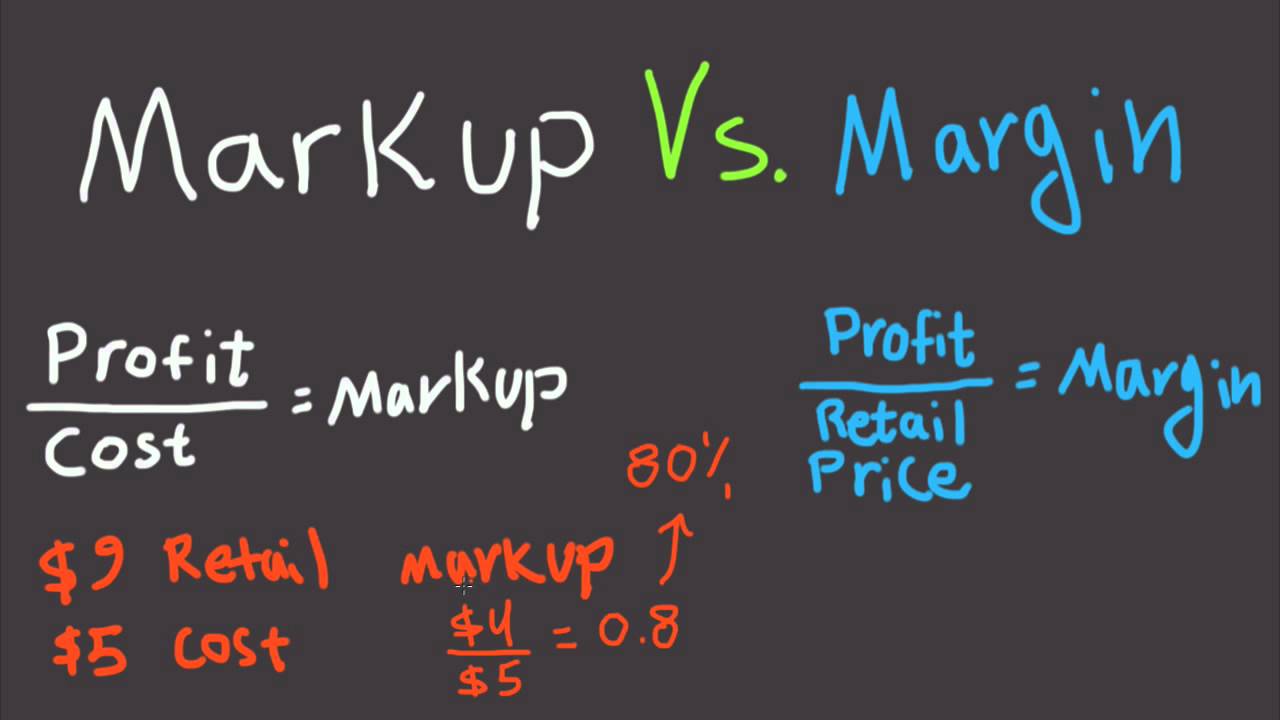
Markup and margin both describe profit, but they use different bases. Markup measures profit as a percentage of cost: (selling price − cost) ÷ cost × 100. Margin measures profit as a percentage of selling price: (selling price − cost) ÷ selling price × 100. If an item costs AED 100 and sells for AED 150, the markup is 50%, while the margin is 33.33%. That difference matters when setting prices, reviewing profitability or building an Excel pricing sheet. This guide shows how to calculate markup vs margin, convert between them and avoid the common mistake of treating the percentages as interchangeable.
Markup vs margin: the basic difference
Start with the same three numbers: cost, selling price and gross profit. Gross profit for one item is selling price minus cost. Markup compares that profit with cost. Margin compares the same profit with selling price. Because the denominator changes, the percentages are different even though the AED profit is identical.
For example, a product that costs AED 200 and sells for AED 250 creates AED 50 of gross profit. Markup is AED 50 ÷ AED 200 = 25%. Margin is AED 50 ÷ AED 250 = 20%. Saying “we make 25% margin” would therefore be wrong in this example. The business has a 25% markup and a 20% gross margin.
How to calculate markup step by step
Step 1: Identify the cost
Use the cost that your pricing model is intended to recover. For a reseller, that may start with the purchase cost. A more detailed model may also allocate freight, packaging or other direct costs. Keep the definition consistent across products so comparisons remain useful.
Step 2: Identify the selling price
Use the price before any analysis-specific adjustments you have decided to exclude. If you are comparing actual transactions, make sure you use the actual selling price after discounts rather than a list price that the customer did not pay.
Step 3: Calculate gross profit
Subtract cost from selling price. If cost is AED 320 and selling price is AED 400, gross profit is AED 80. This AED amount is the numerator for both markup and margin calculations.
Step 4: Divide profit by cost for markup
Use: markup % = (selling price − cost) ÷ cost × 100. With AED 320 cost and AED 400 selling price, AED 80 ÷ AED 320 = 0.25, or 25% markup.
Step 5: Divide profit by selling price for margin
Use: margin % = (selling price − cost) ÷ selling price × 100. With the same figures, AED 80 ÷ AED 400 = 0.20, or 20% margin. The profit amount did not change; only the base used for the percentage changed.
Worked example with AED figures
Assume an office-supplies business buys a printer for AED 1,200 and wants a 30% markup on cost. First calculate the markup amount: AED 1,200 × 30% = AED 360. Add that to cost, giving a selling price of AED 1,560. Gross profit is therefore AED 360.
Now calculate the margin: AED 360 ÷ AED 1,560 = 0.230769, or about 23.08%. A 30% markup does not produce a 30% margin. If the manager had promised a 30% gross margin instead, the required price would be higher: AED 1,200 ÷ (1 − 30%) = AED 1,714.29. At that price, gross profit is AED 514.29 and AED 514.29 ÷ AED 1,714.29 = 30%.
This example shows why teams should specify whether a target percentage means markup or margin. A pricing error on one product may look small, but repeated across hundreds of sales it can materially change expected gross profit.
How to convert markup to margin
When you know the markup percentage but need the equivalent margin, use: margin = markup ÷ (1 + markup). Enter percentages as decimals in the calculation. A 50% markup becomes 0.50 ÷ 1.50 = 0.3333, or 33.33% margin. A 25% markup becomes 0.25 ÷ 1.25 = 20% margin.
How to convert margin to markup
When you know the target margin and need the equivalent markup, use: markup = margin ÷ (1 − margin). A 25% margin becomes 0.25 ÷ 0.75 = 33.33% markup. A 40% margin becomes 0.40 ÷ 0.60 = 66.67% markup. As the target margin rises, the required markup increases quickly because margin is measured against the final selling price.
How to calculate markup vs margin in Excel
Excel is useful when you need the same pricing calculation for many rows. Microsoft documents that Excel formulas begin with an equal sign and that division and multiplication operators can be used in formulas. Put Cost in column A and Selling price in column B. In C2, calculate profit with =B2-A2. In D2, calculate markup with =(B2-A2)/A2. In E2, calculate margin with =(B2-A2)/B2. Format columns D and E as Percentage, then copy the formulas down the table.
If you know cost and want a selling price from a target markup stored in F2, use =A2*(1+F2). If F2 contains a target margin instead, use =A2/(1-F2). Microsoft also notes that percentage calculations are represented as decimal values in Excel, so 30% is stored as 0.30 when entered and formatted as a percentage.
Can you calculate markup vs margin free unlimited times?
The formulas themselves do not have a per-calculation limit. Once you have a spreadsheet or online calculator that accepts cost and selling price, you can reuse the calculation for different products. However, whether a specific online tool is free or has unlimited usage depends on that service’s current limits, account requirements and terms.
For uloveoffice.com, describe the live tool exactly as it operates. If its markup vs margin calculator can be used repeatedly for free without a stated usage cap, that is useful information for people searching for a free unlimited markup vs margin calculator. If the tool has daily, file, account or feature limits, publish those instead of using “unlimited” as an unsupported claim.
Common markup vs margin mistakes
The first mistake is using the words markup and margin as synonyms. The second is applying a target margin directly to cost. Adding 30% to cost creates a 30% markup, not a 30% margin. Another mistake is comparing products with inconsistent cost definitions. Finally, remember that gross margin is not the same as net profit margin: a product can have a healthy gross margin while the business still has operating expenses, finance costs, taxes or other costs to cover.
Frequently asked questions
What is the difference between markup and margin?
Markup is profit divided by cost, while margin is profit divided by selling price. With AED 100 cost and AED 150 selling price, profit is AED 50, markup is 50%, and margin is 33.33%.
How do I calculate a 30% margin?
Divide cost by 1 minus the target margin. If cost is AED 700, use AED 700 ÷ 0.70 = AED 1,000 selling price. Profit is AED 300, which is 30% of AED 1,000.
What margin is a 50% markup?
A 50% markup equals a 33.33% margin. Using the conversion formula, 0.50 ÷ (1 + 0.50) = 0.3333.
What markup gives a 40% margin?
A 40% margin requires a 66.67% markup. Use 0.40 ÷ (1 − 0.40) = 0.6667. For AED 600 cost, that produces an AED 1,000 selling price and AED 400 gross profit.
How do I calculate markup vs margin in Excel?
If A2 is cost and B2 is selling price, use =(B2-A2)/A2 for markup and =(B2-A2)/B2 for margin. Format the result cells as percentages. You can then copy the formulas down for additional products.
Conclusion
Markup vs margin becomes simple once you remember the denominator: markup compares profit with cost, while margin compares profit with selling price. Use the correct formula before setting prices or reviewing performance, and label spreadsheet columns clearly so nobody confuses the two percentages. For a faster calculation, use the relevant markup vs margin tool on uloveoffice.com and verify the cost, selling price and percentage basis before using the result in a quote or pricing decision.
Screenshots needed from the live tool
- Step 1 — Markup vs margin calculator landing page, showing the cost and selling-price fields.
- Step 2 — Example inputs entered, such as AED 1,200 cost and AED 1,560 selling price.
- Step 3 — Calculated markup result, showing 30%.
- Step 4 — Calculated margin result, showing approximately 23.08%.
- Step 5 — Reset/new-calculation state or any copy/export action offered by the live tool.
- Excel example — Spreadsheet columns for Cost, Selling price, Profit, Markup % and Margin %.
Internal links to add
- Target tool: Markup vs margin calculator on uloveoffice.com — insert the exact live URL.
- Related article/tool: Percentage calculator — link to the matching live page if published.
- Related article: Excel formulas for office work — link to the published 2026 Excel formulas guide.
- Related article/tool: Profit or business calculator — link to the closest relevant live page if available.
Sources
- Microsoft Support — Calculate percentages: https://support.microsoft.com/en-us/excel/calculate-percentages
- Microsoft Support — Format numbers as percentages in Excel: https://support.microsoft.com/en-us/excel/format-numbers-as-percentages-in-excel
- Microsoft Support — Create a simple formula: https://support.microsoft.com/en-us/excel/create-a-simple-formula
- Microsoft Support — Calculation operators and precedence in Excel: https://support.microsoft.com/en-us/excel/calculation-operators-and-precedence-in-excel
Editorial note: Verify the current uloveoffice.com tool name, URL, fields, limits and whether repeated use is genuinely free/unlimited before publishing those claims.