
Invoice Format UAE: Free FTA-Compliant Template
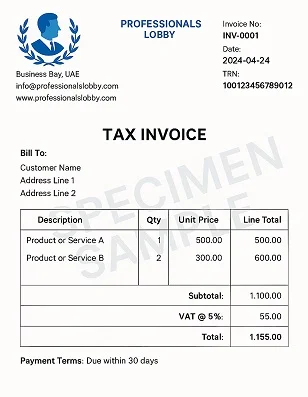
How to make an invoice in the UAE (FTA-compliant, free template)
If you need an invoice format UAE, the easiest solution is to use a free online invoice generator that creates a professional, PDF-ready invoice with all the essential information required for business transactions. A properly formatted UAE invoice includes supplier and customer details, invoice number, invoice date, item descriptions, VAT information (where applicable), payment terms, and totals. With an online invoice generator, you can create, download, print, and share invoices in minutes without installing software.

What is an invoice in the UAE?
An invoice is a commercial document issued by a seller to a customer requesting payment for goods or services provided.
Businesses across the UAE use invoices for:
- Product sales
- Professional services
- Consultancy
- Construction projects
- Property management
- Freelancing
- Maintenance services
- Equipment rental
- Trading businesses
For VAT-registered businesses, invoices should include the information required under the UAE VAT regulations issued by the Federal Tax Authority (FTA).
Why is using the correct invoice format important?
A professional invoice helps:
- Record business transactions
- Request payment from customers
- Maintain accounting records
- Support VAT reporting where applicable
- Improve professionalism
- Reduce payment disputes
Using a consistent invoice format also makes bookkeeping much easier.
What should an invoice format UAE include?
A professional UAE invoice should contain the following information.
Business information
- Company name
- Company logo (optional)
- Business address
- Phone number
- TRN (if VAT registered)
Customer information
- Customer name
- Company name
- Address
- Contact information
Invoice details
- Invoice number
- Invoice date
- Due date
- Purchase order reference (if applicable)
Item details
For every product or service include:
- Description
- Quantity
- Unit price
- Total price
VAT information
Where applicable:
- VAT percentage
- VAT amount
- TRN
- Taxable amount
Totals
- Subtotal
- VAT
- Grand Total
- Currency (AED)
Payment details
- Bank account
- Payment terms
- Notes
- Authorized signature (optional)
How to create an invoice using a free online generator
Creating a professional invoice only takes a few minutes.

Step 1: Open the Invoice Generator
Visit the Invoice Generator on uLoveOffice.com.
Step 2: Enter business information
Fill in:
- Company name
- Address
- Phone number
- TRN (if applicable)
You may also upload your company logo.
Step 3: Add customer details
Enter:
- Customer name
- Company
- Address
- Contact information
Step 4: Enter invoice information
Fill in:
- Invoice number
- Invoice date
- Payment due date
- Currency
Step 5: Add products or services
For each item, enter:
- Description
- Quantity
- Unit price
The generator automatically calculates totals.
Step 6: Add VAT if required
If your business is VAT registered, enter the applicable VAT rate.
The invoice generator calculates VAT automatically.
Step 7: Generate the invoice PDF
Click Generate Invoice.
Your professional invoice is instantly created.
Step 8: Download or print
Download the invoice as a PDF or print it for your records.
Worked example
A web development company completes a website project for a client.
Invoice details:
- Website Design – AED 3,500
- Website Development – AED 5,000
- Hosting Setup – AED 500
Subtotal:
AED 9,000
VAT (5%):
AED 450
Grand Total: AED 9,450
The invoice generator automatically calculates the totals and produces a professional PDF invoice ready to send to the client.
Benefits of using an online invoice generator
Compared to creating invoices manually in Word or Excel, an online generator offers several advantages.
- Professional layout
- Automatic calculations
- VAT calculation
- PDF download
- Printable format
- Mobile friendly
- Unlimited invoices
- Free to use
- Faster than manual templates
- Consistent branding
Businesses can save significant time by generating invoices online instead of formatting every document manually.
Can I generate unlimited invoices?
Yes.
Many online invoice generators allow unlimited invoice creation without requiring a subscription.
This is useful for:
- Freelancers
- Consultants
- SMEs
- Contractors
- Property managers
- Retail businesses
- Service providers
You can create as many invoices as needed throughout the year.
Tips for creating professional invoices
To ensure your invoices look professional:
- Use sequential invoice numbers.
- Include complete customer details.
- Clearly describe each product or service.
- Mention payment terms.
- Include VAT information if applicable.
- Double-check calculations.
- Save invoices as PDF before sending.
- Keep copies for accounting records.
Related PDF tools
After creating your invoice, you may also need to manage your documents.
Useful PDF tools include:
- Compress PDF
- Merge PDF
- Split PDF
- JPG to PDF
- Word to PDF
- Protect PDF
- Rotate PDF
For example, after generating an invoice, you can compress PDF to reduce the file size before emailing it, or merge PDF to combine the invoice with quotations, purchase orders, or supporting documents into a single file.
Frequently asked questions
What is the standard invoice format UAE?
A UAE invoice typically includes supplier details, customer information, invoice number, date, item descriptions, prices, VAT information (if applicable), totals, and payment terms.
Can I create an invoice online for free?
Yes. Online invoice generators let you create professional invoices, download them as PDFs, and print them without purchasing software.
Does every UAE invoice need VAT?
No. VAT information is generally required only for VAT-registered businesses and taxable transactions. If your business is not VAT registered, you should not charge VAT.
Can I generate unlimited invoices?
Many online tools allow unlimited invoice creation without registration or subscription fees.
Can I download my invoice as a PDF?
Yes. Most invoice generators produce printable PDF invoices that can be emailed, printed, or stored digitally.
Conclusion
Using the correct invoice format UAE helps you create professional invoices that are easy to understand, simple to manage, and suitable for business records. An online invoice generator saves time by automatically calculating totals, preparing a clean PDF layout, and allowing unlimited invoice creation. After generating your invoice, you can also use PDF tools to compress PDF, merge PDF, or organize your business documents more efficiently. Visit uLoveOffice.com to create your invoice online for free and download a professional PDF in minutes.